How to view and sit exams on Madrasati
Madrasati has three types of exams: teacher-set, final school exams, and centralized Ministry exams. Here's how to find yours, sit it, and check your score.
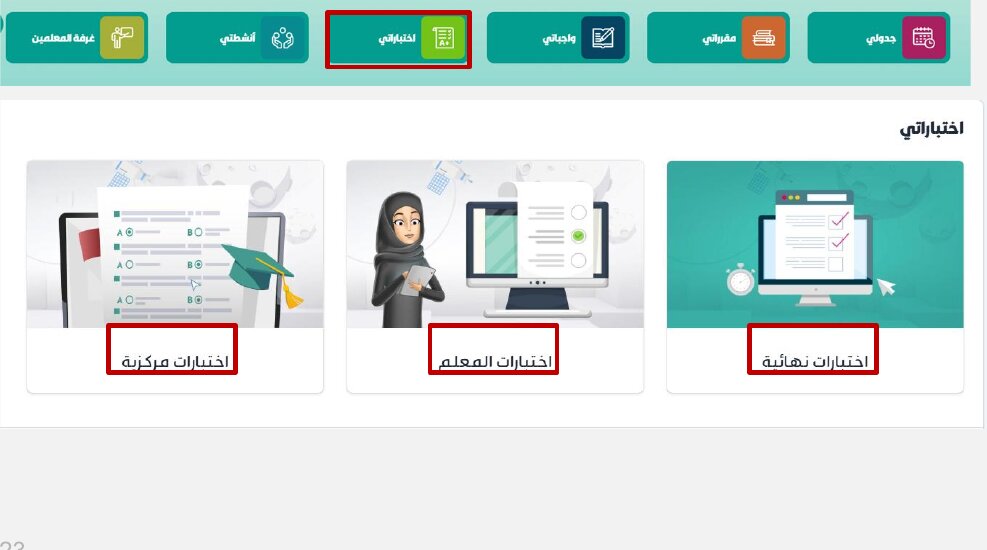
The 'My Exams' (اختباراتي) section hosts three types of exams: Final Exams (اختبارات نهائية — set by school teachers for end of term), Teacher Exams (اختبارات المعلم — class-level assessments), and Centralized Exams (اختبارات مركزية — Ministry-level exams that open via a separate Microsoft link). Each type has sub-tabs for Current, Expired, and Completed exams.
Step-by-step
- 01
Open 'My Exams' (اختباراتي)
Sign in to madrasati.sa. Click the 'اختباراتي' quick-link on the dashboard, or go to Courses and Resources (المقررات والمصادر) → Exams (الاختبارات) in the top menu.
- 02
Choose the exam type
Three tiles appear: Final Exams (اختبارات نهائية), Teacher Exams (اختبارات المعلم), and Centralized Exams (اختبارات مركزية). Pick the one your teacher announced — Teacher Exams is the most common for regular class assessments.
- 03
Find your exam using the tabs and search
Inside each exam type, use the three tabs: Current (الاختبارات الحالية — active), Expired (الاختبارات الفائتة — deadline passed), Completed (الاختبارات المكتملة — finished). Use the search bar to find a specific exam by name.
- 04
Read the exam details before starting
Click 'Details' (تفاصيل) on the exam to see the duration, subject, educational level, and any instructions. Read everything carefully before clicking 'Start Exam'.
- 05
Start the exam and answer questions
Click 'Start Exam' (حل الاختبار) when the exam window is open. The timer starts immediately. Answer questions in any order — answers are saved automatically as you go.
- 06
Submit before the timer ends
Click Submit when finished. If the timer reaches zero before you submit, the exam auto-submits with whatever you've entered.
- 07
Check your score in the Completed tab
Once the teacher releases results, your score appears in the Completed tab (الاختبارات المكتملة) next to the exam name.
Useful tips
- Teacher Exams (اختبارات المعلم) is the most common type for regular class tests — check here first.
- Centralized exams redirect to a separate Microsoft link when clicked — this is expected and normal.
- Test your device and browser before exam day. Use Chrome or Edge for the best compatibility.
- Use a stable internet connection. If it drops mid-exam, sign back in immediately — the timer continues running.
Common questions
Quick links
Looking for a school?
Browse our directory of 1,800+ schools across Saudi Arabia — filter by city, curriculum, fees, and ratings.
Reach parents choosing a school
Sponsor the academic calendar, exam schedule and guides — the pages parents check every term.