How to view and submit homework on Madrasati
Find current assignments, submit your work before the deadline, and check grades — using the واجباتي (My Homework) section.
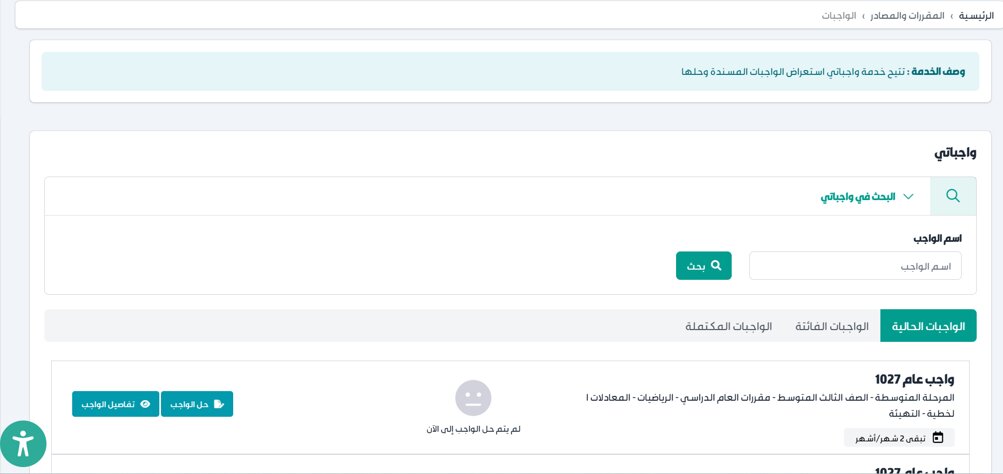
Madrasati organises homework in the 'My Homework' (واجباتي) section, accessible from the dashboard quick links or from Courses and Resources (المقررات والمصادر). Assignments are split into three tabs: Current (الواجبات الحالية), Expired (الواجبات الفائتة — past deadline, not yet submitted), and Completed (الواجبات المكتملة — submitted). Teachers post tasks with deadlines and attached resources; students submit in the same place.
Step-by-step
- 01
Sign in and open 'My Homework' (واجباتي)
Sign in to madrasati.sa and click the 'واجباتي' quick-link on the dashboard, or go to the top menu → Courses and Resources (المقررات والمصادر) → Homework (الواجبات). The homework list appears.
- 02
Choose a tab: Current, Expired, or Completed
Use the three tabs: 'الواجبات الحالية' (Current — open for submission), 'الواجبات الفائتة' (Expired — deadline passed, not submitted), 'الواجبات المكتملة' (Completed — already submitted). Check the Current tab daily for new assignments.
- 03
Search by subject or homework name
Use the search bar at the top of the homework screen to filter by subject. Enter the homework name or subject and press Search to find a specific assignment quickly.
- 04
Open an assignment to read instructions
Click the assignment title or the details button. Read the description carefully, note the exact deadline, and download any attached files or resources before starting.
- 05
Upload your work or type your answer
Attach a file (PDF, Word doc, image) or type your answer in the text box. Click 'Submit' (تسليم) to hand in before the deadline.
- 06
Check the grade and teacher feedback
Once the teacher reviews your submission, the grade and any written feedback appear in the Completed tab next to the assignment.
Useful tips
- Check the Current tab daily — new assignments appear here as soon as the teacher posts them.
- The Expired tab shows what you missed — check it regularly to catch any overdue work.
- You can resubmit before the teacher marks your work. Once graded, ask the teacher to open a resubmission window.
- If a file is too large to upload, convert it to PDF or compress images before trying again.
Common questions
Quick links
Looking for a school?
Browse our directory of 1,800+ schools across Saudi Arabia — filter by city, curriculum, fees, and ratings.
Reach parents choosing a school
Sponsor the academic calendar, exam schedule and guides — the pages parents check every term.